For years the network KPIs arrived in Excel by email, once a week. Every Monday morning: a file with the previous week's numbers, dozens of rows, no filter, no context. Agents would open it on their phone — when they could — and understood little of it. Area meetings turned into data interpretation sessions, not decision-making ones.
The problem wasn't a lack of data. The data was there. The problem was access: slow, awkward, out of context. An agent walking into a client can't open a 40-row Excel sheet to understand how this week's product mix is performing.
The solution: an app built for the field, not the office
I developed a Power App independently — no external consultant, no IT project — directly integrated with company data on SharePoint. The objective was simple: every agent should be able to open the app from their phone in 10 seconds and have a clear picture of their territory.
The architecture is simple. The home screen is a grid of tiles, one for each KPI that truly matters in our network:
- CVS Line Target – 2026 — the revenue target for the main line
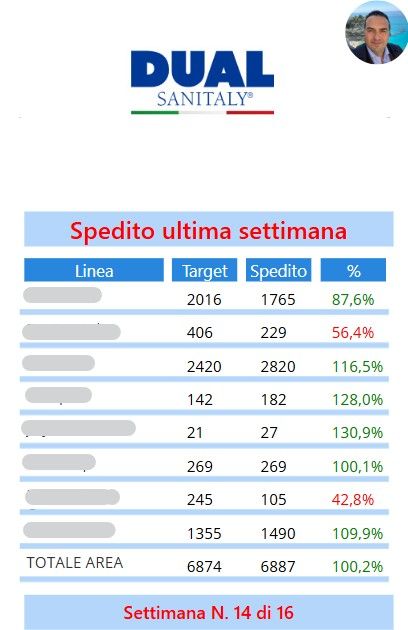
- Last Week Line Target — current week performance vs target
- Bouquet 2 CVS – 2026 and Bouquet Italia — product mix penetration by territory
- Shoulder Brace Top Spot — key product coverage in orthopaedics
- Special Clients 2026 — strategic client status
- Hosiery Display and Gehwol Display — active displays by line
- Last 2 days dispatched — immediate visibility on orders in transit
- Dorsolombotech — performance of the highest-margin product
Each tile leads to a detail screen with data for that individual agent, automatically filtered based on the logged-in user. No Excel, no manual filtering, no email to open.
"An informed agent is an agent who sells better. Not because they're more motivated — but because they know where to focus their energy that morning."
How I built it (and how long it took)
Power Apps connected to SharePoint as the data source. Data is automatically updated every night via a Power Automate flow that consolidates orders from the company CRM. The app is responsive: works on phones, tablets and PCs without changes.
Development time: about three working days for the first functional version. Another day for testing with the first two agents and revisions. The version I use today is the fourth iteration — every update came from direct network feedback.
No programming skills needed. Power Apps uses a formula logic similar to Excel. If you can write a complex VLOOKUP, you can build a functional app. The only real barrier is the time to learn — and for me, it was worth it.
Concrete results
Area meetings changed. Before we spent 30–40 minutes understanding "how we were doing" — extracting information from data. Now we enter meetings already knowing the numbers, and we use the time to decide what to do.
Agents check the app an average of 2–3 times a day. Not because I asked them to: because it became useful. They know in real time if a shipment is blocked, if a special client is below target, if the week's product mix is on track.
The figure that surprised me most: the older agents, the ones who were most sceptical at first, became the most active users. Because the app doesn't change how you sell — it only changes how quickly you have the right information in hand.
If you manage a sales network and still send KPIs via email in Excel, I understand — I did it for years too. But it's no longer necessary. The tools to do it differently exist, cost nothing extra (Power Apps is included in Microsoft 365), and the time to build something functional is much less than you think.